Pages Menu
Categories Menu

Posted by on Apr 6, 2011 in Mobile |

iOS Enterprise MDM Configuration Capabilities


Thought I’d put together an easy to reference list of the various things that can be configured by an enterprise Mobile Device Management administrator for iOS:

Password

  • Required
  • No Repeating/Ascending/Descending Characters
  • Require Alphanumeric
  • Minimum Password length
  • Minimum number of non-alphanumeric characters required
  • Maximum password age (1-730 days)
  • Auto-lock (1-5 minutes)
  • Password History (1-50 Passwords)
  • Grace Period for Device Lock (amount of time the device can be locked without prompting for a password on unlock)
  • Maximum number of failed attempts (before all data on device will be erased)

Restrictions

  • Allow installing apps
  • Allow use of camera
    • Allow FaceTime
  • Allow Screen Capture
  • Allow Automatic Sync while Roaming
  • Allow voice dialing
  • Allow In App Purchase
  • Allow Multiplayer Gaming
  • Allow Adding Game Center Friends
  • Force Encrypted Backups
  • Applications
    • Allow use of YouTube
    • Allow use of iTunes Music Store
    • Allow use of Safari
      • Enable autofill
      • Force fraud warning
      • Enable JavaScript
      • Block Pop-ups
      • Accept Cookes: Always, Never, From Visited Sites
      • Allow Explicit Music & Podcasts
    • Allowed Content Ratings
      • Movies: Don’t Allow Movies, G, PG-13, R, NC-17, Allow All Movies
      • TV: Don’t Allow TV Shows, TV-Y, TV-Y7, TV-G, TV-PG, TV-14, TV-MA, Allow All TV Shows
      • Apps: Don’t Allow Apps, 4+, 9+, 12+, 17+, Allow All Apps

Wi-Fi

  • Service Set Identifier (SSID)
  • Hidden Network (if target network is set to not broadcast)
  • Security Type: Any (Personal), None, WEP, WPA/WPA2, WEP Enterprise, WPA/WPA2 Enterprise, Any (Enterprise)
  • Password

VPN

  • Connection Name
  • Connection Type: L2TP, PPTP, IPSec (Cisco), Cisco AnyConnect, Juniper SSL, F5 SSL, Custom SSL
  • Server Hostname or IP Address
  • Account
  • User Authentication: Password, RSA SecurID
  • Shared Secret
  • Send All Traffic (Route all network traffic through VPN)
  • Proxy Setup

Email

  • Account Description
  • Account Type: IMAP, POP
  • User Display Name
  • Email Address
  • Mail Server and Port
  • Authentication Type: None, Password, MD5 Challenge-Response, NTLM, HTTP MD5 Digest
  • Password
  • Use SSL

Exchange ActiveSync

  • Account Name
  • Exchange ActiveSync Host (Exchange Server)
  • Use SSL
  • Domain
  • User
  • Email Address
  • Password
  • Past Days of Mail to Sync: No Limit, 1 Day, 3 Days, 1 Week, 2 Weeks, 1 Month
  • Authentication Credential Name
  • Authentication Credential
  • Include Authentication Credential Passphrase

LDAP

  • Display Name
  • Account Username
  • Account Password
  • Account Hostname
  • Use SSL
  • Search Settings

CalDAV

  • Account Description
  • Account Hostname and Port
  • Principal URL
  • Account Username
  • Account Password
  • Use SSL

CardDAV

  • Account Description
  • Account Hostname and Port
  • Principal URL
  • Account Username
  • Account Password
  • Use SSL

Subscribed Calendar

  • Description
  • URL
  • Username
  • Password
  • Use SSL

Web Clips (web pages saved to the home screen as bookmarks)

  • Label
  • URL
  • Removable (yes/no)
  • Icon
  • Precomposed Icon
  • Full Screen

Credentials

  • Specify PKCS1 and PKCS12 certificates needed to authenticate access to your network

SCEP

  • URL for SCEP server
  • Name
  • Subject (representation of X.500 name)
  • Subject Alternative Name Type (None, RFC 822 Name, DNS Name, Uniform Resource Identifier)
  • Subject Alternative Name Value
  • NT Principal Name
  • Challenge
  • Key Size: 1024, 2048
  • Use as digital signature
  • Use for key encipherment
  • Fingerprint (hex string)

MDM

  • MDM Server URL
  • Check in URL
  • Topic (Push notification topic for management messages)
  • Identity: Add credentials in Credentials payload, SCEP
  • Sign Messages: yes/no
  • Access Rights granted to remote administrators:
    • Query Device for:
      • Device Information
        • unique device identifier (UDID)
        • device name
        • iOS version
        • device model name and hardware version
        • serial number
        • overall and available storage capacity
        • IMEI number
        • the modem firmware version
        • SIM card ICCID
        • and MAC addresses for integrated Wi-Fi and Bluetooth
        • carrier currently being used
        • the carrier specified by the current installed SIM card
        • the version of the carrier settings (APN) data
        • assigned phone number
        • whether or not data roaming is currently allowed
        • list of configuration profiles installed
        • list installed security certificates and expiry dates
        • list of enforced restrictions
        • hardware encryption capability
        • whether an unlock passcode is set
        • installed applications (with App identifier, name, version, and size)
        • a list of any application provisioning profiles with expiration dates.
    • General Settings
    • Security Settings
    • Network Settings
    • Restrictions
    • Configuration Profiles
    • Applications
    • Provisioning Profiles
  • Add / Remove:
    • Configuration Profiles
    • Provisioning Profiles
  • Security
    • Change device password
    • Remote Wipe
  • Apple Push Notification Service
    • Use Development APNS Server

Advanced

  • Access Point Name (APN): The name of the GPRS access point
  • Access Point User Name
  • Access Point Password
  • Proxy Server and Port
Facebooktwitterredditpinterestlinkedinmail Read More

Posted by on Mar 20, 2011 in The Cloud |

Some Thoughts on Gamification


There seems to be a lot of industry buzz lately around the concept of “gamification”, and the idea is basically one of applying game mechanics to the world of business to motivate employees or customers. Bunchball has done a really nice job with their Gamification 101 white paper of illustrating how gamification can work in a variety of circumstances, and why you should be using it in your business. It’s a good read, and a good place to get started learning the concepts. Some examples of gamification that they give are frequent flyer programs, where customers earn points and “level up” to different statuses over time, and Starbucks’ use of the Foursquare to check in and win “trophies or badges”. Another good resource is the Gamification Encyclopedia at Gamification.org.

Mechanics, Dynamics, and Aesthetics (MDA)

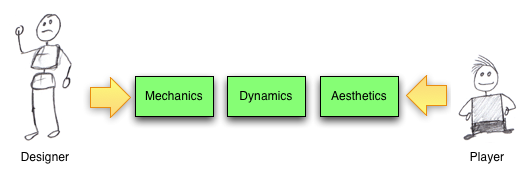
So what makes a game? Bunchball discuss the terms “game mechanics” and “game dynamics” in their white paper, and those terms come from a game design approach called MDA (Mechanics, Dynamics, Aesthetics), described by Hunicke, LeBlanc, and Zubek in their article MDA: A Formal Approach to Game Design and Game Research. The idea is basically that a game designer creates various rules for a game (Mechanics). These rules then work together (in sometimes unexpected ways) to create a system (Dynamics). And a player experiences these Dynamics through the Aesthetics of the game, which they categorize into things like “Challenge”, “Discovery”, or “Narrative”. So, the game designer sets up the game by manipulating the Mechanics, and the player experiences the game through the Aesthetics. Put simply, if the designer can directly manipulate something by changing the rules of the game, it is part of the game mechanics. Dynamics are manipulated indirectly by the designer, and aesthetics are experienced by the player. Game design is complicated, then, because the experience of the player is two steps removed from the rules set forth by the designer.

A simple example can be illustrated with the game of Poker. The mechanics of the game involve dealing cards, anteing, and betting. The dynamics of the game have emerged over time to include things like bluffing. And the aesthetics of the game include things like fellowship (it’s a good game to play with friends) and challenge (your opponents present many obstacles to winning).

Success!

So what makes a game fun? Every game uses game mechanics, but many have been utter failures. What makes a gamification strategy successful? It’s easy to throw together leader boards, loyalty programs, and point systems, but how do you actually drive behavior with gamification? And what exactly is a game anyway? It’s one of those things that you know when you see it, but how do you actually define it? Chris Crawford offers an interesting definition of “game” in his book, Chris Crawford on Game Design, Basically, if there is no competition (either amongst players or against some form of AI), then what you have is a puzzle, not a game. Additionally, if you have no influence over how your opponent is performing, then that competition isn’t a game either. By this definition, solitaire is a puzzle, because there is no competition. A drag race is a competition, but not a game, because you can’t slow the other car down in any way. However, a race where you are allowed to run your opponent off the road is a game.

So, does a successful gamification strategy need to follow this definition? Does there need to be competition, and should employees or customers be able to alter other’s ability to perform? Perhaps not, but competition is likely to be important in any successful gamification strategy.

Pitfalls

So, what are some pitfalls of game design? If some players are able to get too far ahead of the pack, does it create a disincentive for the rest of the players? How can you reward top players without discouraging everyone else? Consider Monopoly: The game starts out fun for everyone, but as one or more players start buying up all the property, the “poorer” players get less and less interested in completing a game that they have very little chance of winning. How could the mechanics of Monopoly be adjusted to keep everyone engaged? It’s important to consider positive and negative feedback loops in the game. Monopoly has a strong positive feedback loop. The more property a player has, the more money they make from other players, which they use to purchase more and more property. To cancel this out, one could adjust the game mechanics to include, say, theft. This could introduce a negative feedback loop by making players who are doing well more likely to have property stolen by players on the poverty side of the equation.

Frequent flyer programs have a similar problem. People who fly frequently form loyalties to airlines because they have so many points built up that they are able to reap the benefits of the program. People with few points have little incentive to be loyal to any specific airline because they are a long way from “leveling up” and seeing any tangible benefit from the program. The airlines probably don’t care as much about these infrequent flyers, but they may be missing out on nurturing loyalties in people who may become more frequent flyers in the future. These “players” could be incentivized to by being entered in a drawing each time they fly, or randomly getting free drinks or being upgraded to first class when seats are available.

Overall

Overall, I think it’s really exciting that business leaders are starting to consider employee and customer motivation from the perspective of the game designer, and it’s nice to see some formalized thought being put forward that takes some lessons from “regular” game designers and researchers. It will be interesting to see what innovative groups like Bunchball come up with over time.

Facebooktwitterredditpinterestlinkedinmail Read More

Posted by on Feb 25, 2011 in Code, The Cloud |

Cloud to Cloud: Using AWS Simple Email Service from Force.com

Amazon released a really interesting service not too long ago called Simple Email Service (SES). It allows you to send individual or bulk emails without having to rely on your own mail servers. This is important because sending (legitimate) mass emails while staying off spam blacklists like Spamhaus is no simple task, and you don’t want all of your company emails to start being blocked by ISPs that subscribe to those blacklists. If you have all of your customer data in Salesforce.com, you’ll be able to email some of them with Salesforce’s standard email capabilities, but they have pretty strict governor limits (1,000 emails per SFDC License) when it comes to sending external emails, so mass emailing is often not a possibility without a third-party provider.

Reasons why you may want to consider using SES

  1. Ever receive an email from Amazon.com? Yeah, so has everybody else. They know a thing or two about sending out mass emails.
  2. Their pricing is ridiculously competitive. Other mass email services start out around $15 per thousand emails. Amazon charges $0.10 per thousand. Of course, other services offer more in the way of campaign management, point-and-click setup, and analytics, but if you’re just sending emails, it’s hard to beat the price.
  3. It’s relatively easy to use. Emails are sent through simple RESTful API calls.


Getting set up

So assuming you’re already an AWS member, first off you have to sign up for SES. That will get you set up with a developer account relatively quickly, and you can test sending emails to a few email addresses with the ses-send-email.pl script that comes with the AWS SES Developer Tools. If you want to actually start sending out mass emails, you have to then request production access from Amazon.

Sending emails from Force.com

First off, get the Apex code here.

Then, take a look through the files:

AWS.cls

This is a top-level abstract class that has a few methods in it that you’ll need for any AWS functions. This includes the code to generate a signature from the current Date/Time and your AWS Secret Key:

public string signature(String awsNow, String secret) {

     system.assert( secret != null ,‘ missing S3.secret key’);

     Blob bsig = Crypto.generateMac(‘HmacSHA256’, Blob.valueOf(awsNow), Blob.valueOf(secret));          

     return EncodingUtil.base64Encode(bsig); 

And the code to generate the authorization header using that signature:


public string headerForAmazonAuthorization(String accessKey, String signature)

{

return ‘AWS3-HTTPS AWSAccessKeyId=’+accessKey+’, Algorithm=HmacSHA256, Signature=’+signature;

}

SES.cls

Being an abstract class, AWS.cls is then subclassed by SES.cls. This includes the method to actually send an email by setting the HTTP headers and body, and sending the request to the SES endpoint. To use this, you just need to send in a List of recipient addresses, your from: address, a subject, and a body for the email. The response from AWS is then written to the debug log, so you can see any error messages sent back by Amazon.

SESEmail.cls

The SESEmail class defines a single SES Email message with multiple recipients, a sender, a subject, and a body, and it takes care of URL Encoding all of that and setting up the Body of the request to Amazon.

AWSKeys.cls 

So this one I didn’t actually write. I got it from the Force.com AWS Toolkit. Mostly it just reads your AWS Access Key and Secret Key from a custom object. The authentication code in that toolkit is a bit out of date for the current version of the AWS API, and I did modify this class to be a singleton so a DML statement doesn’t get kicked off every time you query for your AWS Keys. If you’re using this, you’ll probably also want to make the AWSKey__c SObject private so your entire org doesn’t have access to your AWS keys, but I’ll leave that as an exercise for the reader.

SESController.cls

Last, and I’ll be honest, least, is a dummy VF Page and controller that connects the dots and sends off emails using SES. The page is a pretty simple page that calls the controller:

<apex:page controller=”SESController” action=”{!constructor}” >

And sends an email to a List of recipients:


AWSKeys awsKey = AWSKeys.getInstance(AWSCredentialName);

SES sesEmail = new SES(awsKey.key,awsKey.secret);


List<String> recipients = new List<String>();

recipients.add(‘nobody@modelmetrics.com’); 

String sender = ‘nobody@modelmetrics.com’;

String subject = ‘Test message’;

String body = ‘This is the body of the message’;


sesEmail.sendEmail(recipients,sender,subject,body);


That’s it. Relatively easy. Adding test classes is left as an exercise for the reader ;-).

Facebooktwitterredditpinterestlinkedinmail Read More

Posted by on Apr 26, 2010 in Code |

Importing a Flex 3 AIR project into Flash Builder 4

I had some issues over the weekend trying to import an Flex Builder 3 AIR project into Flash Builder 4. This post gives a good description of how it is supposed to work, and I assume that it does work for Flex web projects, but it didn’t work for me with an AIR project. Every time I imported the AIR project, Flash Builder 4 interpreted it as a Flex Web project, so of course it didn’t actually build. I was migrating from an OSX Flex Builder 3 to a Windows Flash Builder 4, so that may also have been an issue, I’m not sure.

Anyway, the way I finally got it working was to create a new AIR Desktop project in Flash Builder 4 and copy the entire src folder over from the Flex Builder 3 project. The only thing that you can’t copy is the app.xml file, as it seems to be in a slightly different format in FB4, and the project won’t build.

SVN

This causes some problems if you want to continue a development effort using SVN, and other members of your team are using Flex Builder 3, because the actual project can’t be shared between the two versions of the IDE. However, the src folder can be shared without issue, so if you check just that folder out into your new Flash Builder 4 Project shell, and over-write the app.xml file you’ll be good to go, just don’t accidentally commit the app.xml file to the repository, or you’ll break the build for everybody else.

Facebooktwitterredditpinterestlinkedinmail Read More

Posted by on Nov 19, 2009 in Code |

OSX Firefox Flex/Flash redraw bug workaround

There’s a known redraw bug in the OSX version of the Firefox Flash Player plugin that’s pretty irritating. If you do something that causes too many redraw events to get called in quick succession, Flash will fail to redraw the screen properly, and you end up with a mish-mash of phantom objects on the screen:

This happens most commonly with older versions of SWFAddress, but can also happen if you have a canvas with a scrollbar on it, and you scroll up and down rapidly. If the .swf fills the window, the user can fix this issue by resizing the browser window, thus causing the entire .swf to redraw. However, this is clearly not a workable solution. The most obvious way to fix this problem would seem to be to call invalidateProperties() and/or validateNow() on the parent Canvas, but this doesn’t actually work. The Flash Player seems to think it has already been redrawn, and doesn’t do it again.

A quick workaround? Make the parent canvas invisible and then visible again. This causes it to be redrawn. For instance, if you have a canvas with a scroll bar that is causing the problem, you can add an event handler to the Canvas’ scroll event, and cycle the visibility off and on. It’s imperceptible to the user, and fixes the issue.

<mx:Canvas scroll=”handleScrollEvent(event)”/>

private function handleScrollEvent(event:ScrollEvent):void
{
this.visible = false;
this.visible = true;
}

Facebooktwitterredditpinterestlinkedinmail Read More