Pages Menu
Categories Menu

Posted by on Oct 17, 2012 in Code, The Cloud |

Big Data Made Small with Heroku, DynamoDB, and Elastic Map Reduce

Word CloudOne million tweets per day.

An average of fifteen words per tweet.

Four (awesome) days of Dreamforce 2012…

Out of the 60 million words that scrolled across the screen on the Model Metrics Art of Code exhibit Moving the Cloud during Dreamforce 2012, which were the most frequently used? Well, “social” was #1, then “touch” and “mobile”. The word cloud above shows the rest of the top 100. But how did we calculate that? And, more importantly, how can we do so in a way that will easily scale up to working with much larger data sets?

Well, Moving the Cloud is written in Node.js, and I didn’t want to do anything that would tax the production version of the page, so the first thing I did was to create a simplified version of it by stripping out the UI/HTTP layer and adding in the Dynamo package for working with Amazon DynamoDB. DynamoDB is a highly performant, highly scaleable NoSQL database service hosted by Amazon Web Services. Amazon automatically handles scaling the storage space for you with super-fast SSD drives. Your main configuration options are to set the max number of allowed reads per second, and the max number of writes per second. Changing these values takes less than a minute, and you can set up CloudWatch alarms to let you know if you’re getting close to the limits. You pay more for higher limits, and we were seeing around 25-50 tweets per second max, so I set the write limit to 100. The read limit only really matters when you want to start reporting on the data, so I set it pretty low initially.

As you can see from the Trendy-Dynamo code in GitHub, the actual communication with DynamoDB from Node.js is pretty simple. DynamoDB stores Key/Value pairs, and has no defined schema aside from requiring a primary key. The Twitter Streaming API returns JSON documents with a lot of extra cruft, so I pulled out the relavent information and stored in in DynamoDB:
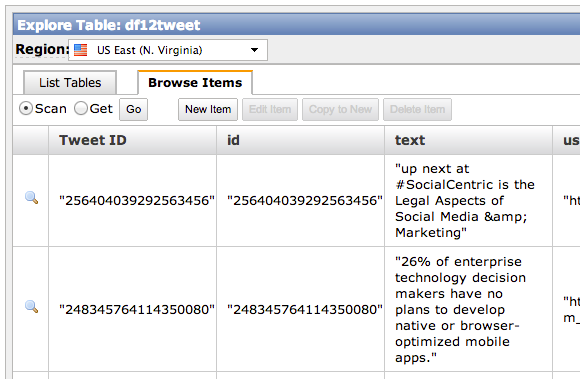
DynamoDB Explorer

Back in the olden days of aught four, I might have set this running on an old linux box laying around my house (I still actually have a few big towers stacked in the basement, along with boxes of power supplies and old parts, but they haven’t been turned on in ages). Then my ISP would drop the connection, or the power supply would fail, and I’d be missing a bunch of data. Enter Heroku. Such an app can literally be hosted for free on the Heroku Cedar Stack with one Worker Dyno:
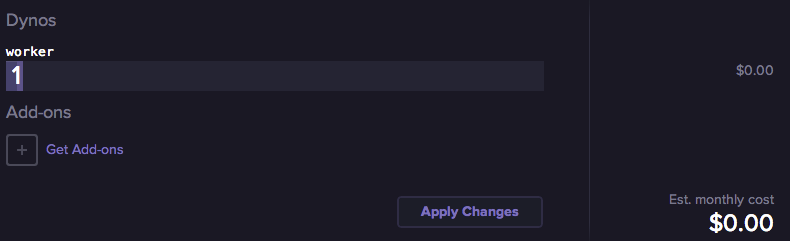
Heroku Worker Dyno

Okay, so that’s the initial setup — let’s move ahead a few days — #DF12 is over, and we have 60 million words to count. This is where Elastic Map Reduce (EMR) comes in. EMR is a hosted instance of Apache Hadoop, and Map-Reduce is a handy algorithm for taking huge data sets and breaking them down into smaller, manageable chunks. Think of it like this — imagine in this image that each of the three multi-colored blocks on the left side is one individual tweet…
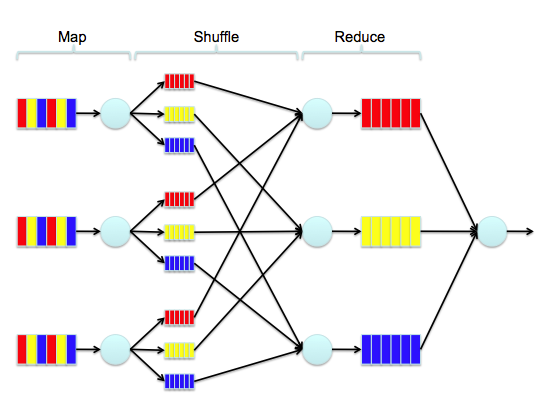
Map Reduce

Say the red block is the word “salesforce”, the yellow block is the word “is”, and the blue block is the word “social”. The first step of the process is to count the instances of each word in that tweet. Then, we increment the count of that word in every tweet. Simple, right? Over time, we break down 60 million words into a reduced set where each word occurs only once, but is accompanied by a number that represents the total number of occurrences. To do this with EMR, the first thing we need to do is to snapshot the data from DynamoDB into Amazon S3. To do this, I’ve used an interactive command line Hadoop tool named Apache Hive. It allows you to map external tables and to query them with SQL-like syntax.

Using Hive, I created an external table for DynamoDB:

CREATE EXTERNAL table dynamo_tweet (tweet_id string, tweet_text string)
STORED BY 'org.apache.hadoop.hive.dynamodb.DynamoDBStorageHandler'
TBLPROPERTIES ("dynamodb.table.name" = "df12tweet","dynamodb.column.mapping" = "tweet_id:Tweet ID,tweet_text:text");

And an external table for S3:

CREATE EXTERNAL TABLE s3_df12snapshot (tweet_id string, tweet_text string)
ROW FORMAT DELIMITED FIELDS TERMINATED BY ','
LOCATION 's3://mm-trendy-dynamo/demo_output/';

And then copy from one to the other:

INSERT OVERWRITE TABLE s3_df12snapshot
SELECT * FROM dynamo_tweet;

Snapshotting takes a little while, so go get a coffee or something… Don’t worry, I’ll wait.

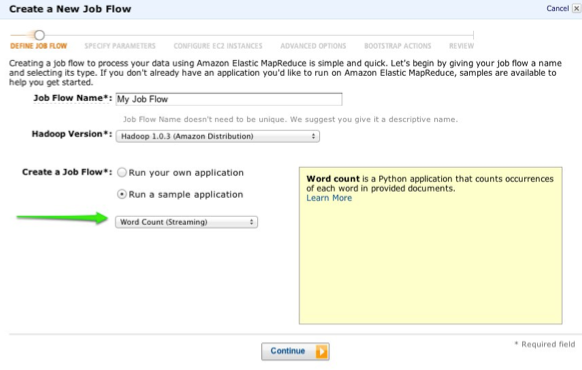
…And, we’re back. Okay, so now we need to actually run the Map-Reduce job to count each word. Luckily, EMR gives us a sample application that does just that:
WordCount

Select the Word Count job, walk through the rest of the wizard, and let it start processing. The amount of time it takes is basically a factor of how many EC2 instances you throw at it, and the processing power of each. When it finishes, the output of the job will be stored in S3, and you can create another external table in Hive:

CREATE EXTERNAL TABLE s3_df12mapreduce (tweet_word string, tweet_count int)
ROW FORMAT DELIMITED FIELDS TERMINATED BY '\t'
LOCATION 's3://mm-trendy-dynamo/outputmapreduce/';

And then query it:

SELECT * FROM s3_df12mapreduce
WHERE LENGTH(tweet_word) > 4
ORDER BY tweet_count DESC
LIMIT 100;

What you do with this map/reduced data is then up to you, but if you’re interested in how I created the word cloud, I used this D3-Cloud Javascript Library

TL;DR: I made a wordcloud with some tweets.

Facebooktwitterredditpinterestlinkedinmail Read More

Posted by on Oct 8, 2012 in Mobile, The Cloud, Videos |

From 0 to 60 MPH with AWS DynamoDB and Heroku

http://www.youtube.com/watch?v=kjhhMpEGF2Y

This will be a technical presentation covering DynamoDB, a scalable, managed Database in the Cloud. DynamoDB follows the NoSQL paradigm, and offers unmatched performances by using Solid State Disks and replication, allowing users to tune the performance at the level they want. We will start with a quick introduction to DynamoDB, and then dive deeper with some cool demos and examples, including connecting an App from Heroku to DynamoDB. The speaker assumes that the audience has at least some familiarity with NoSQL databases, API calls, the Heroku platform, and Web Services.

Facebooktwitterredditpinterestlinkedinmail Read More

Posted by on Oct 8, 2012 in Mobile, The Cloud, Videos |

Security Best Practices for Mobile Development

http://www.youtube.com/watch?v=CHnkgWAOAxY

In the enterprise, apps need to be secure. A lost or stolen phone or tablet can mean your company data falling into the wrong hands. Join us to explore the security features available on both iOS and Android, learn how app data can be compromised, and receive best practices for the development of secure enterprise apps on both platforms.

Facebooktwitterredditpinterestlinkedinmail Read More

Posted by on Oct 8, 2012 in Mobile, The Cloud, Videos |

Developing Offline-Capable Apps with the Salesforce Mobile SDK and SmartStore

http://www.youtube.com/watch?v=ny0XfTNm1_s

If a sales rep has five minutes with a doctor in the basement of a hospital, or a service rep needs detailed equipment specs in a remote location, they might not have a data signal when they need it most. Salesforce Mobile SDK SmartStore functionality adds JSON document storage for both native and hybrid applications on iOS and Android. Join us to learn how to build an offline-capable application for salesforce.com, and some of the things to think about along the way.

Facebooktwitterredditpinterestlinkedinmail Read More

Posted by on Sep 25, 2012 in Mobile, The Cloud |

Mobile Device Management and Enterprise Application Development

With Gartner reporting that the top three technology agendas for CIOs globally are analytics, mobile, and the cloud, Tech Republic reporting that iOS is now as secure as Blackberry, and Forbes saying “the sin of ignoring mobile will not go unpunished” if you aren’t considering how to roll out mobile devices and apps for your cloud services, you’re missing the boat.

Apart from what you want your workforce to do with their mobile devices, the most important thing you should be considering is how they can do it without compromising secure company information. Enter Mobile Device Management (MDM) providers and Mobile Application Development Platforms (MADP), but the wide array of MDM providers can be dizzying. Gartner has a Magic Quadrant for Mobile Device Management Software that can be helpful, but the reality is that there is an industry-wide commoditization of MDM occurring. The core MDM functions are controlled by device manufacturers (Apple, Google, Samsung, HTC, etc.), so MDM vendors aren’t able to do much that sets them apart with core device security features. Where they have distinguished themselves is with add-ons like MADP, application management (enterprise app stores), cloud services, analytics, automation of compliance measures, file/content sharing, and PC management combined with mobile management.

“Wrapper” MDM

There are two basic models for Enterprise MDM in the marketplace today: “wrapper” based and full device security through manufacturer-provided APIs. The best known example of the former model is that of Good Technology. Good’s core offering provides access to corporate email, calendar, contacts, and a secure browser within an encrypted container app. This is beneficial in Bring Your Own Device (BYOD) scenarios because users are able to use their personal devices unrestricted as they normally would, with all corporate information being locked into the container app. Where this doesn’t work so well is that the replacements for standard apps on devices lack functionality and integration with other device features and with apps that aren’t developed using Good’s MADP, Good Dynamics. That is by design, but can still limit worker productivity. Another limitation is that Good’s device-level security offering, Good Mobile Manager isn’t as feature rich as that of other MDM vendors who have focused entirely on that strategy.

Device Security MDM

With a few exceptions, most of the rest of the MDM vendors on the market have focused on using the device manufacturers’ MDM APIs in order to manage security at the device level. This is a solid approach, because it follows the best practices set by the manufacturers, and secures the entire device. However, with BYOD programs, you may find your users are unhappy about having their personal devices locked down, which may limit the security policies that you can realistically deploy without your users getting out their pitchforks. Some of the most prominent examples of this type of MDM are MobileIron, AirWatch, Zenprise, and Fiberlink MaaS360. I can say that the majority of clients that I’ve worked with have typically either implemented Good Technology or MobileIron. MobileIron is well known for good reporting and automation capabilities, but doesn’t offer a MADP. Airwatch is probably the most mature cloud-based offering, and does include an SDK to embed security features into custom apps. Fiberlink includes PC management, which is a direction Gartner predicts most MDM vendors will be moving toward in the future. Zenprise has solid reporting capabilities, and a strong mobile VPN solution.

Mobile Application Development Platforms

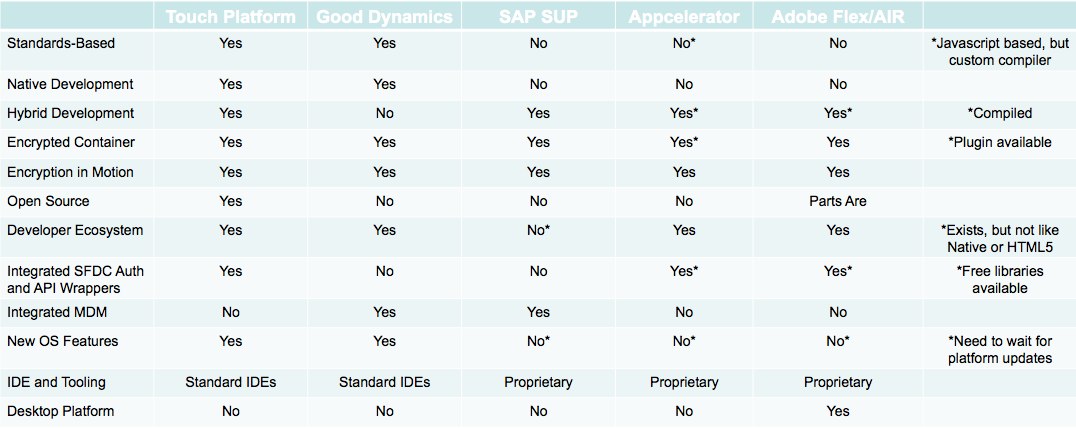
What about application development? Some MDM vendors offer a MADP, some don’t, and some MADP vendors don’t offer an MDM. So, if you are developing custom apps for your enterprise, how do you decide which MADP vendor to choose? First, I think it’s helpful to come up with some criteria for evaluation:

    It should be Standards Based. Architectures based on broad industry standards like those created by Apple, Google, or the W3C are more flexible, more scalable, and less tied to proprietary 3rd-party capabilities that may meet your needs today but not in the future.
    It should have both Native and Hybrid development options available. Native is often better for single-device deployments where apps need to perform well, look good, have a high degree of sophistication, or get to market quickly. Hybrid can be good for multi-device deployments, but development times often increase substantially
    It should have an Encrypted Application Container. Many mobile devices offer device-level encryption. Some don’t, most notably Android phones running the Gingerbread version of the OS (which is most of them right now, unfortunately). Even so, as I showed at a recent Dreamforce Session, hardware encryption isn’t foolproof. Many iOS apps that rely on hardware encryption are leaving their data easily accessible to anyone who gets ahold of the device. An encrypted application container keeps the data for your application locked away, even if the device encryption is compromised.
    It should have a Strong Developer Ecosystem. Developer and Consumer ecosystems feed on each other. The more consumers are using a technology, the more interested developers are in making apps for it. The more apps there are, the more consumers will be interested in using the technology. Looking at developer interest in a platform is a strong indicator of how well it’s doing, and how well it will continue to do in the future. This is a core reason for why iOS and Android are doing well, while Blackberry and Symbian aren’t, and why Microsoft is paying prominent developers to build apps for Windows Phone.
    It should be Open Source. Open Source technologies avoid dead ends. They also allow 3rd parties to improve and build upon them, and to search for security holes. If you have the source for the platform you’re building upon, you’ll never have an instance where it’s impossible to meet a key business requirement because the technology doesn’t support it and the source is proprietary.
    It should have Immediate Support for new OS Features. The next time Apple or Google release some awesome new feature as a part of their mobile OS, you should be able to take advantage of it without waiting for a 3rd party to add support for it.
    It should Integrate with your MDM. You’ll be rolling this app out to your workforce, so you want to make sure you can keep it secure and available to the users who need it.
    It should Integrate with the Cloud. Mobile apps need access to data, and secure integrations with Cloud services are a key component for providing that data.

So, here’s where some of the MADP leaders stack up:

MADP Comparison

Salesforce Touch Platform

The Salesforce Touch Platform “leverages the power of the Force.com platform and its proven security, reliability, and scale for enterprise applications”, and offers standards-based options for Native and Hybrid development on both iOS and Android devices. The Salesforce Touch Platform contains three core components: Force.com for Touch, Mobile Container SDKs, and Identity. The SDK is Open Source Software on Github, and contains an encrypted container for storing and transferring data. Since it’s built on industry standard technologies, the developer ecosystem comes built in, and Github allows for anyone to be able to contribute patches to be reviewed by the Salesforce team.

Good Dynamics

Good Dynamics allows application developers to build apps that use the same encrypted wrapper technology employed by the Good Email/Calendar application. This has been employed by well known brands like Box.com and iAnnotate PDF to create apps that integrate with the Good container. Good Dynamics is based on native libraries that are included in the source of natively built apps for iOS and Android. Like Salesforce.com, the reliance on standard development technologies means that the developer ecosystem comes built in. Some weaknesses are the current lack of a hybrid development model, a proprietary closed-source system, and if you’re building apps for Salesforce.com, a lack of OAuth and REST API wrappers out of the box (though, the native Salesforce SDK could be combined with Good Dynamics to add this).

SAP Sybase Unwired Platform (SUP)

The SUP platform compliments SAP’s MDM offering, Afaria. It’s strengths are in delivering a hybrid app with a single codebase to many different device types. However, this model doesn’t come without tradeoffs. If you need integration with SAP from a mobile device, SUP may be the best option, but you’ll be giving up the slick, highly performant apps possible with native development, and you’ll be committing yourself to a complicated proprietary middleware architecture.

Appcelerator Titanium

Appcelerator Titanium allows you to build cross-platform apps using the Javascript language, but with a custom native compiler. With a free connector for Salesforce.com, it provides a good, if slightly non-standard way of building cloud-connected mobile apps. Appcelerator’s strength is in building cross-platform apps that are more performant than is possible with Phonegap/HTML5 hybrid solutions, but you are locking yourself into a proprietary client architecture to some degree. The developer ecosystem with Appcelerator is strong, and they even publish quarterly developer surveys that are always worth reading to see where the industry is headed.

Adobe Flex/AIR

Adobe has a long-standing partnership with Salesforce.com, and we’ve developed many great apps on Adobe technologies with our 2GO platform. Similar to Appcelerator, the main strength with Flex/AIR is that one codebase can be used to export apps for multiple different mobile devices, and even desktop PCs (Windows, OSX, and Linux). AIR comes with an encrypted SQLite database built in, and performance is typically better than would be expected of a standard Phonegap/HTML5 type app. Some businesses have shied away from Flex/AIR since Adobe open sourced Flex under the Apache foundation because it was widely reported as an abandonment of the technology, but Adobe has affirmed their commitment to Flex and the Flash Builder toolset longterm.

Facebooktwitterredditpinterestlinkedinmail Read More