Pages Menu
Categories Menu

Posted by on Aug 21, 2011 in Mobile, The Cloud |

oAuth 2.0 for Salesforce.com

At this point in time, we’ve implemented the oAuth 2.0 User-Agent flow and the Refresh Token flow for iOS, Android, and Flex/AS3. I figure that makes us as much an expert at doing this as anybody, so I thought I’d take a moment to describe some of the details. First off, the reason you want to use oAuth 2.0 when developing apps for mobile devices… no token. We’ve been developing mobile apps for Salesforce.com for the last 4 or so years, and the need to provide a username, password, and token has always been a pain point. Since it’s a 24 character alpha-numeric string, this was especially problematic back before iPhones had copy/paste functionality (“is that a l, an I or a 1?”). With oAuth 2.0, you can finally get rid of having to worry about the token.

oAuth 2.0 is a popular universal specification for authentication to various web services. If you’ve used a mobile app that logs into Facebook, Twitter, LinkedIn, or Chatter, you’ve probably used it. for Salesforce.com provides four different authentication flows:

  • Web Server
  • User-Agent
  • Refresh Token
  • Username/Password

A combination of the User-Agent flow and Refresh Token flow are recommended for mobile applications, so that’s what I’ll demonstrate here.

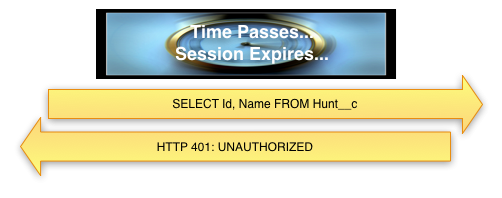
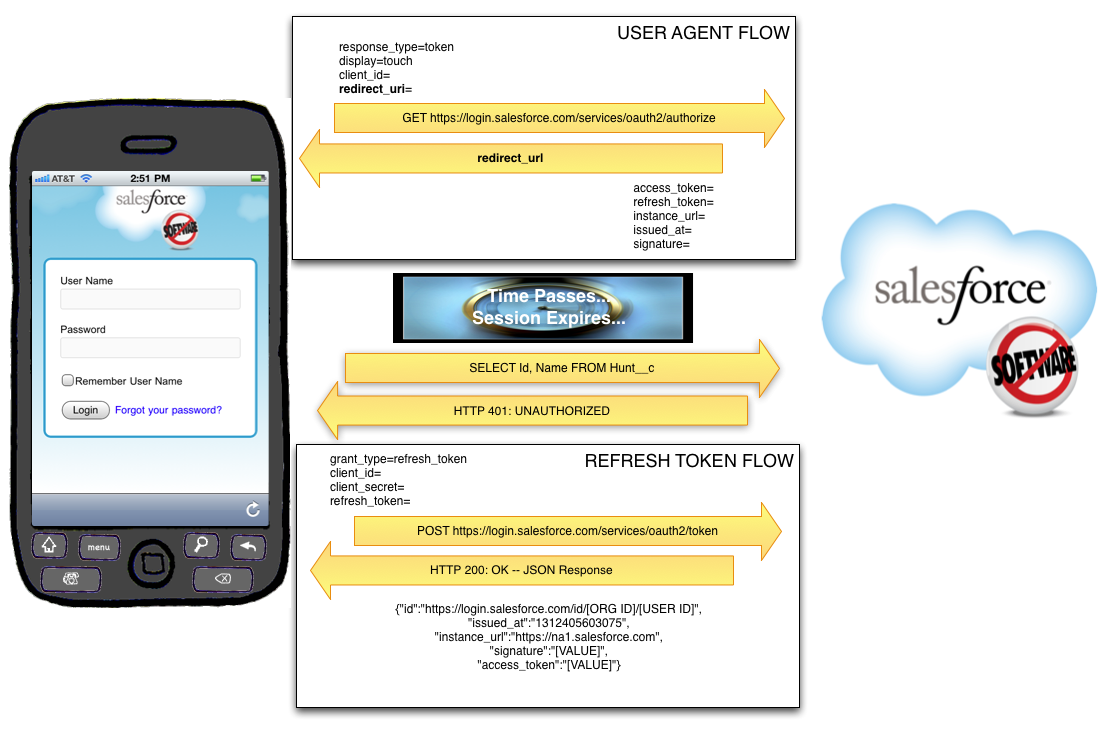
First off, you should understand both flows from a high level:
 

Salesforce Configuration

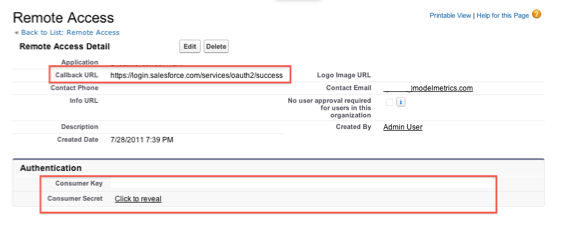
Both the User-Agent flow and the Refresh Token flow require a Remote Access Application be set up in the target SFDC org. This is configured under Setup=>Develop=>Remote Access. Required fields are Application, Contact Email, and Callback URL. There are a variety of rules about what the Callback URL can be, but the simplest way to do this is to have it be: https://login.salesforce.com/services/oauth2/success

Once saved, SFDC will generate and display a Consumer Key and a Consumer Secret. Both of these will be needed by the application for login.
User-Agent Flow

The User-Agent flow involves the use of a webview within the application. The app passes a special Salesforce.com URL to that webview, which renders a login view.

First, the user will be asked to log in, and then they will be asked to confirm that they would like to provide access to Salesforce.com using this application:
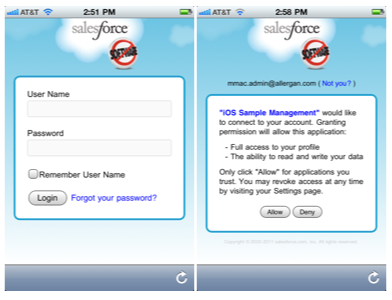
The URL passed to SFDC in order to render this login view is in this format:

https://login.salesforce.com/services/oauth2/authorize?

response_type=token&

display=touch&

client_id=[CONSUMER KEY FROM REMOTE ACCESS]&

redirect_uri=https%3A%2F%2Flogin.salesforce.com%2Fservices%2Foauth2%2Fsuccess

Upon successful login, SFDC will redirect the webview to the URL specified as the redirect_uri (which must be the same as the Callback URL specified in the Remote Access Application setup). After the Callback URL will be a hash tag and then a series of parameters returned by Salesforce:

access_token=[ACCESS TOKEN (Session Id)]

&refresh_token=[REFRESH TOKEN]

&instance_url=https%3A%2F%2Fna1.salesforce.com

&id=https%3A%2F%2Flogin.salesforce.com%2Fid%[ORG ID]%[USER ID]

&issued_at=1312403866216

&signature=[SIGNATURE]

The Access Token specified here is the Session ID that will be used for all subsequent calls to the API. The Refresh Token must be saved securely to disk, as it will be used in conjunction with the Consumer Key and Consumer Secret to get a new Access Token from SFDC when the current on expires. The Org Id, User Id, Issued At Time (number of milliseconds since the Unix Epoch), and Signature should be saved as well.

Refresh Token Flow

At some point in time, your Access Token will expire. This may come as a shock, so be sure to prepare your friends and family. The app will learn that the session ID has expired when it attempts to access the API and the response is either:

  • SOAP API: HTTP 500 Internal Server Error, with a faultCode: <faultcode>sf:INVALID_SESSION_ID</faultcode>
  • REST API: HTTP 401 Unauthorized

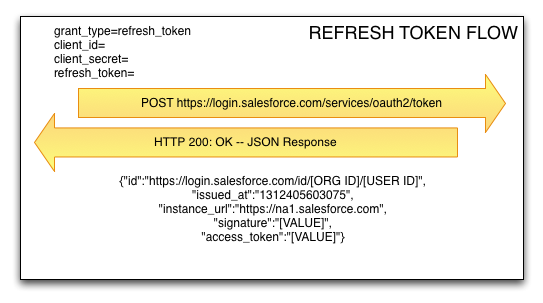
The amount of time a session ID remains valid is configured under Security Controls => Session Settings  in SFDC Setup. When it expires, the app will have to use the Refresh Token flow to request another Access Token from SFDC. To do this, the application will send a POST request to SFDC including the Refresh Token, the Consumer Key, and the Consumer Secret. SFDC will respond with a new Access Token.

NOTE: At no time does the application store the Username or Password of the individual logging into the app.
So, that’s it. I hope you’ve enjoyed this foray into the world of oAuth 2.0 and Salesforce.com.


Facebooktwitterredditpinterestlinkedinmail Read More

Posted by on Jul 18, 2011 in The Cloud |

Setting Up and Using DiffDog for Salesforce.com Deployment Validation

There are a few different ways to deploy metadata from org to org with Salesforce.com. The three main options are to use Eclipse, to use Ant (the “Force.com Migration Tool”), or to use Change Sets. The first two are completely manual to set up (although Ant, obviously, is able to be run over and over again). Change Sets have a lot of promise, because they do handy things like searching for dependencies, but as of this writing, they are still prone to missing important bits, especially with profiles, so you can’t rely on them to produce a perfect deploy from one org to another. Consequently, it’s important to be able to quickly validate that a deployment was successful, and that everything that you meant to deploy from one org to another actually did get deployed.

Enter DiffDog…

DiffDog is a great tool for validating that the metadata between two orgs is identical, and, when used in conjunction with Eclipse, it can be used to push changes from one org to another. It can be used to compare any of the metadata types that are able to be checked out using Eclipse: Objects, Page Layouts, Profiles, Workflow, Reports, etc. The main benefit with this tool over other diff tools is that it allows for the comparison of XML files with ignoring the order of XML nodes. This is important because the metadata between two orgs is XML based, and can be functionally identical, but rendered in different orders. Because of this, with a regular flat-file diff tool, you will get lots of false positives. DiffDog can be configured to properly compare XML files, thus eliminating these false positives. This post describes some optimal settings for use with SFDC, and the process for comparing orgs and deploying changes.

To start with, download the tool from Altova: 

http://www.altova.com/download/diffdog/diff_merge_tool_professional.html

Setup

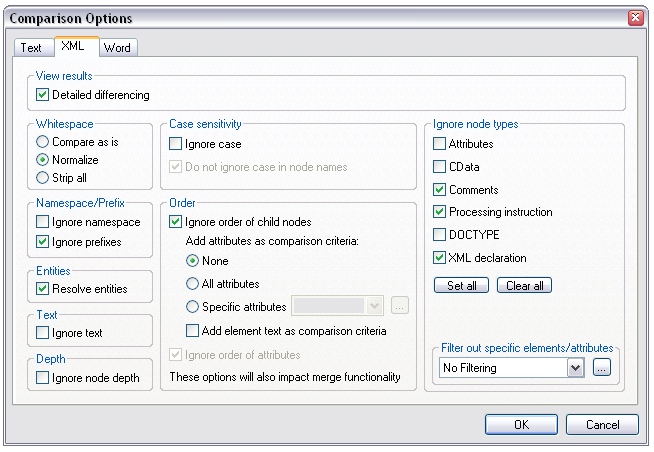
Once you’ve downloaded the app and registered it, go to the Tools menu, choose “Comparison Options”, and select the XML tab. This part is important: you want to make sure the comparison ignores the order of child nodes. This basically means that XML nodes can be rendered in any order and still be considered identical. Click the “Ignore order of child nodes” box in the Order section. All of the other options should be default, but double-check to make sure they match this screenshot.

File:DiffDog1.jpg


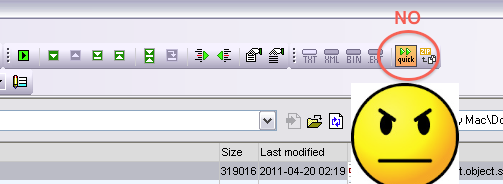
Additionally, if “quick” diff is turned on for folder comparison (it will be by default), make sure to turn it off:


You want to do extension-based comparison (EXT):


Check Out the Orgs

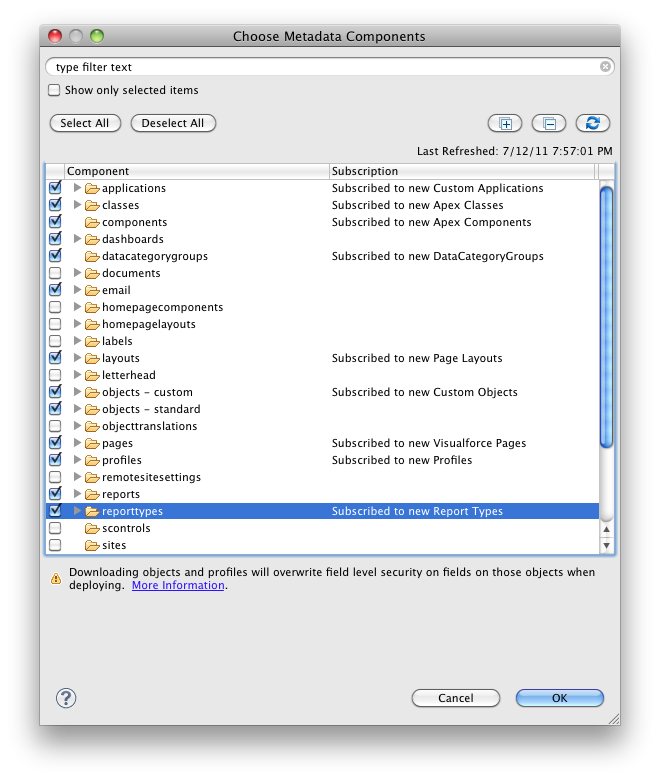
You will now have to check out the metadata objects that you want to compare from both SFDC orgs using Eclipse. Let’s assume one org is a sandbox and one is production. Note that if you want to compare profiles, you will need to select all of the metadata types for everything that you want to compare profile permissions for. For instance, if you want to compare Field-Level Security on Custom Objects, you will need to check out Profile metadata AND Custom Object metadata. SFDC only sends the profile metadata for the metadata types that you have checked out. If you try to do only profiles, the files will be practically empty.

File:DiffDog4.jpg


The metadata from the two orgs that you checked out will be located in your Workspace directory. You can generally figure out where this is by right-clicking on one of the files in Eclipse, and selecting “Properties”.

Using DiffDog

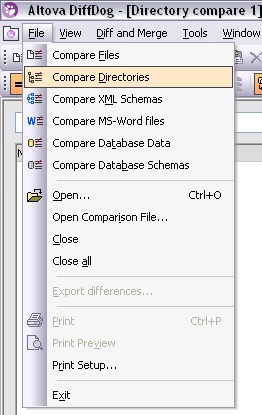
You’ll then want to pick a metadata type and open the two org’s folders for that type in DiffDog. For instance, to compare Objects, select “Compare Directories” from the File Menu…

File:DiffDog5.jpg


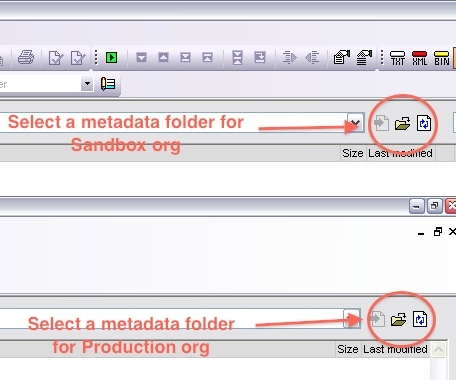
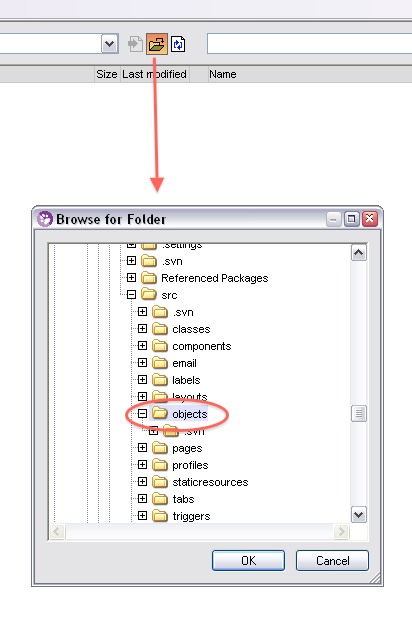
…and then select a metadata folder for each org. I’d suggest putting your sandbox org on the left and your production org on the right so that you’re moving changes from left to right, but you can do it either way.


File:DiffDog7.jpg

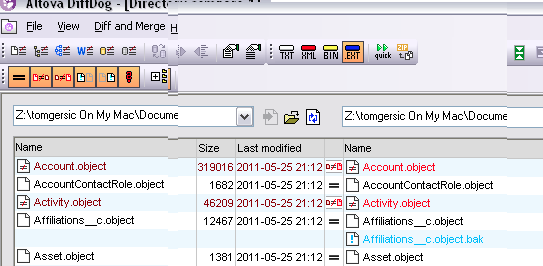
Once you’ve done this, DiffDog will initiate a high-level diff of all files in the directories, and will display something like this. Lines displayed in black are identical, lines displayed in Red have differences, and lines in blue are missing in one org or the other.


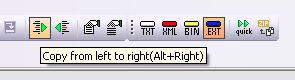
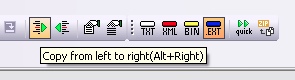
If you need to move an entire object over, you can do that here by clicking on the blue name and pressing the “Copy from left to right” or “Copy from right to left” button, depending on which direction you want to go.

File:DiffDog9.jpg


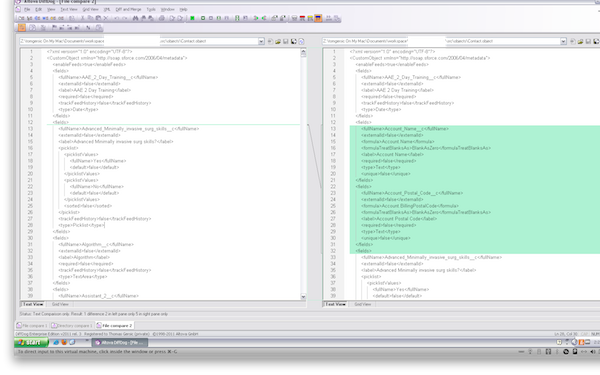
If you want to inspect the differences between two files, double-click on one, and it will launch a flat file-based diff that looks something like this:


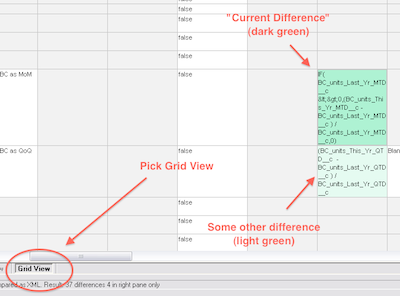
This is not what you want. You want to select the “Grid View” tab at the bottom left of the window. This launches the grid-based diff tool that will show you differences between the two metadata objects:


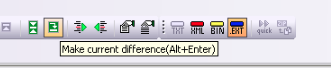
Differences are highlighted in light green, and the “current difference” is highlighted in a darker green. To move a change from one org to another, you’ll have to click on the box in the grid in the org you want to move FROM, and then click the “Make current difference” button in the top toolbar (or hit Alt-Enter) to highlight it in dark green.

File:DiffDog12.jpg


Once you’ve done this you can copy the change over with the “Copy from Left to Right” button:

File:DiffDog13.jpg


Deploying Your Changes

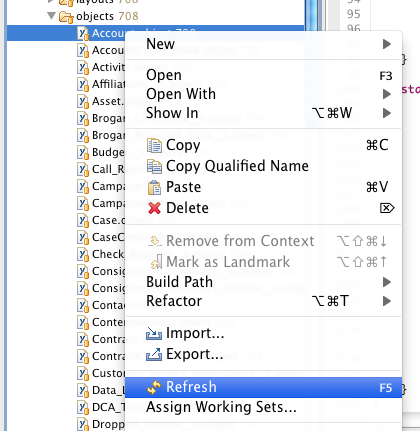
You’ll then want to save (Ctrl-S or File=>Save). This will save your changes locally. Note that they have not yet been deployed to SFDC. To do this, you’ll have to go back to Eclipse. Find the file (or group of files) that you saved in your Eclipse project, right click on it, and select “Refresh”. This will cause Eclipse to attempt to deploy your changes to SFDC. This could result in one or more errors, so be sure to watch the Problems tab for any errors. If you’re deploying to Production, this step can take some time if the org has a lot of Apex code, because all tests will be re-run when you deploy. A minute or so is common. 10-15 minutes isn’t unheard of.


Facebooktwitterredditpinterestlinkedinmail Read More

Posted by on Apr 26, 2011 in The Cloud |

The day the cloud stood still. Lessons learned roundup…

The well-publisized outage of EBS on multiple availability zones in the US-EAST-1 Region of AWS last week kicked off some excellent blog posts from companies who, through robust architectural choices, managed to weather the storm quite well. It lasted five days, it’s been called the worst cloud computing disaster ever, and Amazon’s communications strategy didn’t exactly shine, but it has presented an opportunity to learn from the companies that are hosting their sites on the AWS cloud better than many of their peers.

This is just a round-up of some of these posts, and the advice given. They’ve been edited down, of course, so be sure to read each of these articles for the whole story:

The Cloud is Not a Silver Bullet — Joe Stump, CTO of SimpleGeo

  • Everything needs to be automated. Spinning up new instances, expanding your clusters, backups, restoring from backups, metrics, monitoring, configurations, deployments, etc. should all be automated.
  • You must build share-nothing services that span AZs at a minimum. Preferably your services should span regions as well, which is technically more difficult to implement, but will increase your availability by an order of magnitude.
  • An avoidance of relying on ACID services. It’s not that you can’t run MySQL, PostgreSQL, etc. on the cloud, but the ephemeral and distributed nature of the cloud make this a much more difficult feature to sustain.
  • Data must be replicated across multiple types of storage. If you run MySQL on top of RDS, you should be replicating to slaves on EBS, RDS multi-AZ slaves, ephemeral drives, etc. Additionally, snapshots and backups should span regions. This allows entire components to disappear and you to either continue to operate or restore quickly even if a major AWS service is down.
  • Application-level replication strategies. To truly go multi-region, or to span across cloud services, you’ll very likely have to build replication strategies into your application rather than relying those inherent in your storage systems.

How SmugMug survived the Amazonpocalypse — Don MacAskill, CEO of SmugMug

  • Spread across as many AZs as you can. Use all four.
  • If your stuff is truly mission critical (banking, government, health, serious money maker, etc), spread across as many Regions as you can.
  • Beyond mission critical? Spread across many providers.
  • Since spreading across multiple Regions and providers adds crazy amounts of extra complexity, and complex systems tend to be less stable, you could be shooting yourself in the foot unless you really know what you’re doing.
  • Build for failure. Each component (EC2 instance, etc) should be able to die without affecting the whole system as much as possible.
  • Understand your components and how they fail. Use any component, such as EBS, only if you fully understand it. For mission-critical data using EBS, that means RAID1/5/6/10/etc locally, and some sort of replication or mirroring across AZs, with some sort of mechanism to get eventually consistent and/or re-instantiate after failure events.
  • Try to componentize your system. Why take the entire thing offline if only a small portion is affected?
  • Test your components. I regularly kill off stuff on EC2 just to see what’ll happen.

AWS outage timeline & downtimes by recovery strategy — Eric Kidd, Randomhacks.net

Eric took an interesting look at various potential strategies, and how long a company would have been offline during the EBS outage:

  • Rely on a single EBS volume with no snapshots: 3.5 days
  • Deploy into a single availability zone, with EBS snapshots: over 12 hours
  • Rely on multi-AZ RDS databases to fail over to another availability zone: longer than 14 hours for some users.
  • Run in 3 AZs, at no more than 60% capacity in each: This is the approach taken by Netflix, which sailed through this outage without no known downtime
  • Replicate data to another AWS region or cloud provider: This is still the gold standard for sites which require high uptime guarantees.

The AWS Outage: The Cloud’s Shining Moment — George Reese, Founder of Valtira and enStratus

The Amazon model is the “design for failure” model. Under the “design for failure” model, combinations of your software and management tools take responsibility for application availability. The actual infrastructure availability is entirely irrelevant to your application availability. 100% uptime should be achievable even when your cloud provider has a massive, data-center-wide outage…

There are several requirements for “design for failure”:

  • Each application component must be deployed across redundant cloud components, ideally with minimal or no common points of failure
  • Each application component must make no assumptions about the underlying infrastructure—it must be able to adapt to changes in the infrastructure without downtime
  • Each application component should be partition tolerant—in other words, it should be able to survive network latency (or loss of communication) among the nodes that support that component
  • Automation tools must be in place to orchestrate application responses to failures or other changes in the infrastructure (full disclosure, I am CTO of a company that sells such automation tools, enStratus)

Today’s EC2 / EBS Outage: Lessons learned — Stephen Nelson-Smith, Technical Director of Atalanta Systems

  • Expect downtime…What matters is how you respond to downtime
  • Use amazon’s built-in availability mechanisms
  • Think about your use of EBS:
    • EBS is not a SAN
    • EBS is multi-tenant…Consider using lots of volumes and building up your own RAID 10 or RAID 6 from EBS volumes.
    • Don’t use EBS snapshots as a backup…Although they are available to different availabilty zones in a given region, you can’t move them between regions.
    • Consider not using EBS at all
  • Consider building towards a vendor-neutral architecture…Cloud abstraction tools like Fog, and configuration management frameworks such as Chef make the task easier.
  • Have a DR plan, and practice it
  • Infrastructure as code is hugely relevant…one of the great enablers of the infrastructure as code paradigm is the ability to rebuild the business from nothing more than a source code repository, some new compute resource (virtual or physical) and an application data backup.
Facebooktwitterredditpinterestlinkedinmail Read More

Posted by on Apr 21, 2011 in The Cloud |

It’s Not Broken. You’re Just Doing It Wrong.

Okay, so the title is a bit harsh.

I was intrigued by the rather excellent post over at the blog Il y a du thé renversé au bord de la table, [Rant] Web development is just broken. Yoric makes the argument that web developers are forced to deal with too many “nightmares” that have very little to do with programming. First you have to decide on a programming language. Should you use PHP, C#, Java, Ruby, Perl, or Python? Then you have to choose a web server and OS. Windows/IIS or *nix and Apache? OSX? BSD? Solaris? If you go with Linux, which distro do you choose? Is it worth it to pay for Red Hat, or will Fedora do? What about Ubuntu? Then you have to choose a DBMS, of course. Do you want Oracle? Well, can you afford Oracle? Then there’s MySQL, SQLServer, or PostgreSQL. Or maybe one of the NoSQL databases like MongoDB, CouchDB, or Cassandra. And then you probably want to choose a server-side framework. Rails? Spring? Zend? And a client-side framework, of course, so you don’t have to worry too much about all the differences between the JS engines in each different browser. JQuery? Prototype? Scriptaculous?

And then, once everything is selected, it all has to be configured to work together without (too many) security holes. But, of course, how much does the average developer really know about configuring a secure Linux environment with Apache? Or setting up a secure IIS? And even if the developer does know a lot about configuring all of this, wouldn’t it be more productive to have him or her focused on developing actual application features rather mucking around in Apache2.conf or php.ini, or trying to figure out why their package manager can’t find the right package for some random server component? How do I configure CPAN, again? Do I really need the Multiverse, or will the Universe do? Then, of course, you’ll probably want an ORM, and you’ll need to decide on how you want to glue all the bits and pieces together.

Not to mention keeping all of that up to date and working as new releases get rolled out… oh, and what about scaling up to meet the increased demand if you start to get really popular and get bought by Conde Nast?

Great points. Couldn’t agree more. Anybody guess where I’m going with this?

Tired of worrying about infrastructure? You want to start coding now? Great, take a look at Elastic BeanstalkHeroku, or Force.com VMForce (yeah, I know, “coming soon”). No infrastructure setup required. You still have to choose a language and a platform, I guess, but that seems unavoidable. You have to make some choices in life. However, you don’t have to care about which OS or web server to use, and you don’t have to manage updates of server software. AWS might all be running in VMWare within a virtualized Windows 98 stack based on a billion hand-built Commodore 64s for all I care. As long as it works. And the DBMS is a service too… you don’t have to set it up, you just pick whichever one you want. When VMForce is launched, you’ll have database.com as a DBMS. With Elastic Beanstalk, you have RDS or SimpleDB. With Heroku, you have PostgreSQL out of the box, with a ton of other choices available, but you don’t set them up yourself, you just add them to your account, and they get set up for you.

What about security? Does your data center have 24-hour manned security, including foot patrols and perimeter inspections? Well, Salesforce does. Is your server certified by PCI, ISO, SAS70, and HIPAA? Well, AWS is, and Heroku is hosted on AWS, and they have their own operations team that monitors the system 24/7. Even Multi-Factor Authentication is just another service at AWS. And if somebody finds a security flaw in any of these platforms, it’s not your problem. Somebody else can figure it out and fix it, hopefully before you even know about it. Of course, it’s still important to write secure code, sanitize user inputs, parameterize SQL queries, etc., but at least that’s all in _your_ code. You can focus on writing good code, and not on whether or not you accidentally configured an Apache mod incorrectly, or accidentally allowed anonymous FTP access to your web server, or if your version of PHP has a buffer overrun bug that will allow some random hacker to drop your User table.

You’ll probably still need to glue some things together, and if you’re doing web development, you’ll still want a client-side framework so you don’t have to worry too much about all the various inconsistencies between browsers, but with the infrastructure headaches out of the picture, it’s easier to just start coding.

Facebooktwitterredditpinterestlinkedinmail Read More

Posted by on Mar 20, 2011 in The Cloud |

Some Thoughts on Gamification


There seems to be a lot of industry buzz lately around the concept of “gamification”, and the idea is basically one of applying game mechanics to the world of business to motivate employees or customers. Bunchball has done a really nice job with their Gamification 101 white paper of illustrating how gamification can work in a variety of circumstances, and why you should be using it in your business. It’s a good read, and a good place to get started learning the concepts. Some examples of gamification that they give are frequent flyer programs, where customers earn points and “level up” to different statuses over time, and Starbucks’ use of the Foursquare to check in and win “trophies or badges”. Another good resource is the Gamification Encyclopedia at Gamification.org.

Mechanics, Dynamics, and Aesthetics (MDA)

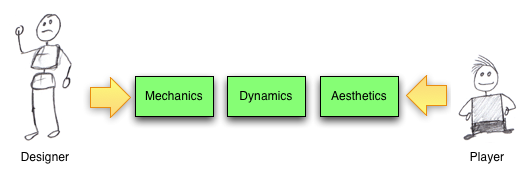
So what makes a game? Bunchball discuss the terms “game mechanics” and “game dynamics” in their white paper, and those terms come from a game design approach called MDA (Mechanics, Dynamics, Aesthetics), described by Hunicke, LeBlanc, and Zubek in their article MDA: A Formal Approach to Game Design and Game Research. The idea is basically that a game designer creates various rules for a game (Mechanics). These rules then work together (in sometimes unexpected ways) to create a system (Dynamics). And a player experiences these Dynamics through the Aesthetics of the game, which they categorize into things like “Challenge”, “Discovery”, or “Narrative”. So, the game designer sets up the game by manipulating the Mechanics, and the player experiences the game through the Aesthetics. Put simply, if the designer can directly manipulate something by changing the rules of the game, it is part of the game mechanics. Dynamics are manipulated indirectly by the designer, and aesthetics are experienced by the player. Game design is complicated, then, because the experience of the player is two steps removed from the rules set forth by the designer.

A simple example can be illustrated with the game of Poker. The mechanics of the game involve dealing cards, anteing, and betting. The dynamics of the game have emerged over time to include things like bluffing. And the aesthetics of the game include things like fellowship (it’s a good game to play with friends) and challenge (your opponents present many obstacles to winning).

Success!

So what makes a game fun? Every game uses game mechanics, but many have been utter failures. What makes a gamification strategy successful? It’s easy to throw together leader boards, loyalty programs, and point systems, but how do you actually drive behavior with gamification? And what exactly is a game anyway? It’s one of those things that you know when you see it, but how do you actually define it? Chris Crawford offers an interesting definition of “game” in his book, Chris Crawford on Game Design, Basically, if there is no competition (either amongst players or against some form of AI), then what you have is a puzzle, not a game. Additionally, if you have no influence over how your opponent is performing, then that competition isn’t a game either. By this definition, solitaire is a puzzle, because there is no competition. A drag race is a competition, but not a game, because you can’t slow the other car down in any way. However, a race where you are allowed to run your opponent off the road is a game.

So, does a successful gamification strategy need to follow this definition? Does there need to be competition, and should employees or customers be able to alter other’s ability to perform? Perhaps not, but competition is likely to be important in any successful gamification strategy.

Pitfalls

So, what are some pitfalls of game design? If some players are able to get too far ahead of the pack, does it create a disincentive for the rest of the players? How can you reward top players without discouraging everyone else? Consider Monopoly: The game starts out fun for everyone, but as one or more players start buying up all the property, the “poorer” players get less and less interested in completing a game that they have very little chance of winning. How could the mechanics of Monopoly be adjusted to keep everyone engaged? It’s important to consider positive and negative feedback loops in the game. Monopoly has a strong positive feedback loop. The more property a player has, the more money they make from other players, which they use to purchase more and more property. To cancel this out, one could adjust the game mechanics to include, say, theft. This could introduce a negative feedback loop by making players who are doing well more likely to have property stolen by players on the poverty side of the equation.

Frequent flyer programs have a similar problem. People who fly frequently form loyalties to airlines because they have so many points built up that they are able to reap the benefits of the program. People with few points have little incentive to be loyal to any specific airline because they are a long way from “leveling up” and seeing any tangible benefit from the program. The airlines probably don’t care as much about these infrequent flyers, but they may be missing out on nurturing loyalties in people who may become more frequent flyers in the future. These “players” could be incentivized to by being entered in a drawing each time they fly, or randomly getting free drinks or being upgraded to first class when seats are available.

Overall

Overall, I think it’s really exciting that business leaders are starting to consider employee and customer motivation from the perspective of the game designer, and it’s nice to see some formalized thought being put forward that takes some lessons from “regular” game designers and researchers. It will be interesting to see what innovative groups like Bunchball come up with over time.

Facebooktwitterredditpinterestlinkedinmail Read More

Posted by on Feb 25, 2011 in Code, The Cloud |

Cloud to Cloud: Using AWS Simple Email Service from Force.com

Amazon released a really interesting service not too long ago called Simple Email Service (SES). It allows you to send individual or bulk emails without having to rely on your own mail servers. This is important because sending (legitimate) mass emails while staying off spam blacklists like Spamhaus is no simple task, and you don’t want all of your company emails to start being blocked by ISPs that subscribe to those blacklists. If you have all of your customer data in Salesforce.com, you’ll be able to email some of them with Salesforce’s standard email capabilities, but they have pretty strict governor limits (1,000 emails per SFDC License) when it comes to sending external emails, so mass emailing is often not a possibility without a third-party provider.

Reasons why you may want to consider using SES

  1. Ever receive an email from Amazon.com? Yeah, so has everybody else. They know a thing or two about sending out mass emails.
  2. Their pricing is ridiculously competitive. Other mass email services start out around $15 per thousand emails. Amazon charges $0.10 per thousand. Of course, other services offer more in the way of campaign management, point-and-click setup, and analytics, but if you’re just sending emails, it’s hard to beat the price.
  3. It’s relatively easy to use. Emails are sent through simple RESTful API calls.


Getting set up

So assuming you’re already an AWS member, first off you have to sign up for SES. That will get you set up with a developer account relatively quickly, and you can test sending emails to a few email addresses with the ses-send-email.pl script that comes with the AWS SES Developer Tools. If you want to actually start sending out mass emails, you have to then request production access from Amazon.

Sending emails from Force.com

First off, get the Apex code here.

Then, take a look through the files:

AWS.cls

This is a top-level abstract class that has a few methods in it that you’ll need for any AWS functions. This includes the code to generate a signature from the current Date/Time and your AWS Secret Key:

public string signature(String awsNow, String secret) {

     system.assert( secret != null ,‘ missing S3.secret key’);

     Blob bsig = Crypto.generateMac(‘HmacSHA256’, Blob.valueOf(awsNow), Blob.valueOf(secret));          

     return EncodingUtil.base64Encode(bsig); 

And the code to generate the authorization header using that signature:


public string headerForAmazonAuthorization(String accessKey, String signature)

{

return ‘AWS3-HTTPS AWSAccessKeyId=’+accessKey+’, Algorithm=HmacSHA256, Signature=’+signature;

}

SES.cls

Being an abstract class, AWS.cls is then subclassed by SES.cls. This includes the method to actually send an email by setting the HTTP headers and body, and sending the request to the SES endpoint. To use this, you just need to send in a List of recipient addresses, your from: address, a subject, and a body for the email. The response from AWS is then written to the debug log, so you can see any error messages sent back by Amazon.

SESEmail.cls

The SESEmail class defines a single SES Email message with multiple recipients, a sender, a subject, and a body, and it takes care of URL Encoding all of that and setting up the Body of the request to Amazon.

AWSKeys.cls 

So this one I didn’t actually write. I got it from the Force.com AWS Toolkit. Mostly it just reads your AWS Access Key and Secret Key from a custom object. The authentication code in that toolkit is a bit out of date for the current version of the AWS API, and I did modify this class to be a singleton so a DML statement doesn’t get kicked off every time you query for your AWS Keys. If you’re using this, you’ll probably also want to make the AWSKey__c SObject private so your entire org doesn’t have access to your AWS keys, but I’ll leave that as an exercise for the reader.

SESController.cls

Last, and I’ll be honest, least, is a dummy VF Page and controller that connects the dots and sends off emails using SES. The page is a pretty simple page that calls the controller:

<apex:page controller=”SESController” action=”{!constructor}” >

And sends an email to a List of recipients:


AWSKeys awsKey = AWSKeys.getInstance(AWSCredentialName);

SES sesEmail = new SES(awsKey.key,awsKey.secret);


List<String> recipients = new List<String>();

recipients.add(‘nobody@modelmetrics.com’); 

String sender = ‘nobody@modelmetrics.com’;

String subject = ‘Test message’;

String body = ‘This is the body of the message’;


sesEmail.sendEmail(recipients,sender,subject,body);


That’s it. Relatively easy. Adding test classes is left as an exercise for the reader ;-).

Facebooktwitterredditpinterestlinkedinmail Read More